Email Channel Overview
Symbee Connect supports servicing email in your contact center via two fundamental methods - Standard Email or 3rd Party Email Routing. For details on 3rd Parting Email Routing see the separate 3rd Party Email Routing section.
In this documentation portal, Standard Email refers to the email channel implementation where your email is sent to (or forwarded into) Amazon Simple Email Service (Amazon SES), and your agents service each email (review, reply, and forward) using the email client embedded within the Symbee Connect end user UI. Standard Email also refers to the capability of allowing agents to send unsolicited outbound emails unrelated to inbound emails being serviced.
Support for Amazon WorkMail - ends March 31 2027
If you are an existing customer with a Symbee Connect Email Channel setup currently using Amazon WorkMail, please refer to Migrating from an existing Symbee Connect Email Setup that used Amazon WorkMail.
Email Delivery Provider - Symbee Connect or Amazon Connect
Back in 2018 when Symbee Connect first implemented the email channel, there was no option to bring in email interactions directly through Amazon Connect. Therefore Symbee Connect has its own complete email conversation delivery method. This is referred to within Symbee Connect as the Symbee Delivery Provider.
In 2024, Amazon Connect released support of email contacts through Amazon Connect Contact Flows and therefore full integration with Lambda functions, and delivering Email to agents via Amazon Connect Routing Profiles. This is referred to within Symbee Connect as the Amazon Delivery Provider.
Symbee Connect fully supports Email from either provider. There are pros and cons of each. The overall general agent end-user experience is the same regardless of which Delivery Provider is being used. Email still looks and behaves the same to the agent in the Symbee Connect User/Agent UI regardless of the delivery provider.
Amazon Connect Delivered Email
Refer to AWS Amazon Connect Email documentation for an overview on how email gets processed and delivered into and out of Amazon Connect.
When an email gets delivered to an agent for servicing, the same Symbee Connect Email Composer UI familiar to Symbee delivered emails is also used to service Amazon delivered emails. Any Email Message Templates and Quick Reponses configured and assigned to the user in Amazon Connect are available for use in the Symbee Connect User/Agent UI. Additionally other Symbee Connect specific features like the Auto Text library, and Symbee Connect Email Signatures can also be used when servicing Amazon delivered email.
The remainder of this section covers an overview of how Symbee Connect delivered email gets processed and delivered.
How Symbee Connect Email Works
Symbee Connect enables contact center agents to receive, manage, and respond to customer emails using the email client built into the Symbee Connect user interface. Agents can also initiate new outbound email conversations directly from Symbee Connect.
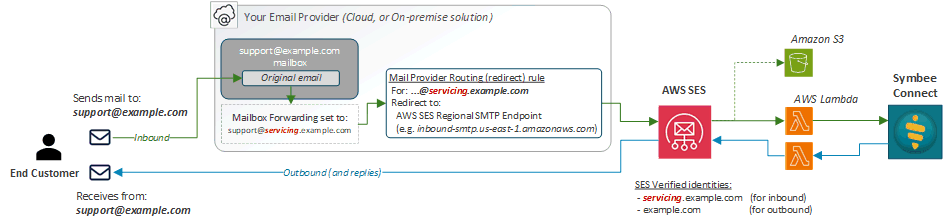
The following diagram shows the high-level flow of Symbee Connect delivered Email:
Inbound Email Processing
Symbee Connect uses Amazon Simple Email Service (SES) to receive and process inbound email. Symbee Connect deploys only the lightweight AWS resources needed to receive and securely retain email data within your organization's own AWS account, while all email servicing functionality is delivered and managed through the Symbee Connect cloud.
Your existing email provider (such as Microsoft 365 or Google Workspace) continues to receive email sent to your organization's public-facing email addresses.
Assuming your email domain is example.com, to enable an email address for contact center servicing:
- A dedicated email routing domain, such as servicing.example.com, is configured as a verified domain identity in Amazon SES. This requires only the DNS verification records provided by SES — no additional mailboxes or separate DNS hosted zones or actual subdomain setup is necessary.
- Your existing email provider is configured to forward email from selected mailboxes (for example, support@example.com) to corresponding addresses on the routing domain (for example, support@servicing.example.com). The original email can continue to be retained in the existing mailbox (based on how you configure the forwarding).
- Your email provider routes these forwarded messages to the regional Amazon SES Email Receiving SMTP endpoint, using an outbound SMTP connector or equivalent mail-routing configuration (generally referred to as SMTP Routing).
- Amazon SES receiving rules store the incoming email in Amazon S3 and invoke an AWS Lambda function, which notifies Symbee Connect that a new email has arrived and makes it available for servicing by contact center agents.
Email content remains within your organization's email infrastructure and AWS account. Symbee Connect coordinates the processing and servicing of email without transferring the actual email content into Symbee's cloud infrastructure.
Outbound Email and Replies
Agents can reply to received emails, forward emails, and initiate new outbound emails directly from the Symbee Connect User/Agent UI.
Outbound email is delivered using Amazon SES within your organization's AWS account.
Each configured email address can specify a public-facing From address, allowing outbound messages and replies to appear as though they originated from your organization's existing email address (for example, support@example.com), rather than the internal routing address (of support@servicing.example.com).
Your public-facing sending domain (e.g. example.com) must also be verified as an identity in Amazon SES (both for send permission, and email authentication purposes - DKIM, DMARC, etc).
This allows customers to continue corresponding with the same familiar email addresses, regardless of whether their messages are being serviced through Symbee Connect.
Integration with Your Existing Email Environment
Symbee Connect does not replace your existing email provider or require changes to your organization's public-facing email addresses or MX records.
Your existing mailboxes can remain operational, and your email provider continues to manage normal inbound mail delivery. Only the email addresses selected for contact center servicing need to be configured for forwarding and SMTP routing into Amazon SES.
The exact forwarding and SMTP routing configuration varies by email provider. Refer to the provider-specific configuration instructions for details.
Next Steps
- See Email Channel Setup and Configuration for a step-by-step guide on setting up your Email Channel for the first time
- Or continue to Standard Email Configurations